
What Is IPTV? The Complete Guide for Canadian Viewers (2026) – CRTC Rules, Legal Risks & Setup Guide
IPTV stands for Internet Protocol Television. It is a technology that transmits live television broadcasts and on-demand video over a broadband internet connection—using the exact same internet data packets that load websites or play YouTube videos. Unlike traditional cable TV, which requires a dedicated coaxial cable line, or satellite TV, which requires a physical dish antenna pointed at the sky, IPTV only requires a stable internet connection and a compatible player app or set-top box. In Canada, IPTV providers must be registered with the CRTC or follow strict exemption rules to distribute content legally.
If you have ever watched live programming on CBC Gem, caught a hockey game on Sportsnet+, or logged into a streaming TV app on your phone, you have already used IPTV. Over the past decade, television delivery has undergone a quiet transition. Traditional TV networks are dismantling their analog broadcast towers and coaxial copper networks, migrating the entire infrastructure to internet-based transmission.
For Canadian consumers, this shift represents both an opportunity and a source of confusion.The opportunity is obvious: cutting the cord and switching to internet-based television can save the average Canadian household over $100 per month. The confusion stems from the emergence of thousands of low-cost online services advertising claims such as “15,000 live channels for $10 a month” alongside legitimate providers like Bell Fibe TV, Rogers Xfinity TV, RiverTV, and VMedia..
Understanding the Canadian IPTV landscape in 2026 requires looking past user interfaces. The difference between a legal, licensed service and an unauthorized, grey-market stream lies in the regulatory compliance under Canada’s Broadcasting Act, licensing agreements with copyright owners, and the technical delivery systems operating behind the scenes. This guide is written to help you understand how the technology works, navigate the legal landscape, troubleshoot playback issues, and set up a compliant media player.
💬 People Also Ask: What does IPTV stand for?
IPTV stands for Internet Protocol Television, which is the delivery of television content over IP networks. This contrasts with delivery through traditional terrestrial, satellite, and cable television formats.
What Is IPTV?
⚡ Quick Answer: IPTV is the delivery of television programming over Internet Protocol (IP) networks. It works by transmitting encoded video streams in continuous data packets to specific IP addresses, rather than broadcasting all channels simultaneously over cable lines or satellite frequencies, allowing for high-definition, interactive, and multi-device viewing.
To understand IPTV, it helps to compare it to the television formats that dominated the last half-century. Traditional cable and satellite systems use a continuous broadcast model. In a legacy coaxial cable network, the provider sends every channel’s signal down the wire to your home simultaneously. When you change channels on a traditional cable box, you are simply instructing the box to tune to a different frequency on the incoming line. This requires massive physical bandwidth and keeps you locked into a single physical location where the coaxial cable is terminated.
IPTV, by contrast, only sends the channel you are actively watching. When you select a channel on an IPTV player, it sends a request back to the provider’s server. The server then initiates a unicast or multicast stream of data packets directly to your device’s IP address. This package-based transmission model means IPTV can be accessed over any stable internet connection, on any compatible device, anywhere in Canada.
The Three Core Components of an IPTV System
- The Ingestion and Encoding Headend: Broadcast satellite signals, live camera feeds, and pre-recorded video files are captured and compressed using modern video codecs (such as H.264, H.265/HEVC, or AV1).
- The Content Delivery Network (CDN): Geographically distributed networks of servers cache and replicate the encoded stream segments. When a viewer in Calgary selects a channel, the stream is delivered from a CDN edge node located within the city, minimizing latency and buffering.
- The Client-Side Player Application: An app installed on a smart TV, streaming stick, or computer (such as Vibe Viso, TiviMate, or Apple TV) receives the incoming data packets, reassembles them, decompresses the video, and renders it on screen in real-time.
[Satellite / Live Feed] ──> [Encoding Headend] ──> [CDN Edge Server (Local City)] ──> [ISP Gateway] ──> [Home Router] ──> [IPTV Player App]💬 People Also Ask: Is IPTV the same as Netflix or standard streaming apps?
While both transmit video over the internet, Netflix focuses almost entirely on pre-recorded Video-on-Demand (VOD) using asynchronous unicast streaming. IPTV specializes in delivering live, synchronized television broadcasts, complete with structured electronic program guides (EPG) and real-time channel switching.
→ Learn how Vibe Viso handles live stream playback — an advanced BYOM player optimized for high-bitrate live TV feeds.
How Does IPTV Work in Canada?
⚡ Quick Answer: IPTV works by converting live TV signals into digital data packets, which are cached on local Canadian Content Delivery Networks (CDNs) and routed through ISPs using protocols like HLS or MPEG-DASH. Legal telecom services use managed multicast networks, while independent services use unicast over the public internet.
To understand the difference in quality between various IPTV services, we must look at the two primary transmission architectures used to deliver streams to Canadian homes.
Multicast Delivery vs. Unicast Streaming
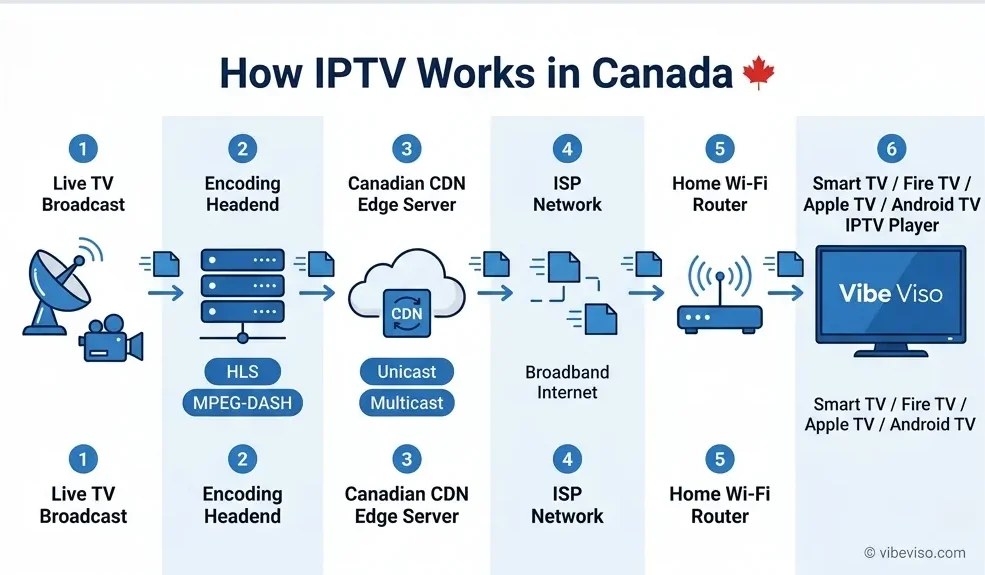
Managed Multicast IPTV (Telecom Networks)
Major Canadian telecommunications companies (such as Bell with Fibe TV and Telus with Optik TV) deliver their television services over private, managed fiber-to-the-home (FTTH) networks using IP Multicast. This architecture relies on the Internet Group Management Protocol (IGMP, RFC 3376).
In a multicast setup, the ISP sends a single video feed to a local network node. When your set-top box requests a channel, the local node replicates the feed to your specific port. This prevents the ISP’s network backbone from becoming congested, as a million viewers watching a hockey game only consume the bandwidth of a single stream on the main transmission line.
WARNING
If you use your own router behind a telecom gateway, you must enable IGMP Snooping in your router’s LAN settings. Without IGMP Snooping, the router treats multicast stream packets as broadcast packets, sending them to every connected device on your home network. This causes a “multicast storm” that can crash smart home plugs, security cameras, and older laptops.
Unicast OTT Streaming (Over-the-Top Services)
Independent IPTV services (such as RiverTV, VMedia, and grey-market providers) operate over the public, unmanaged internet using unicast streaming. In unicast, every single viewing device receives its own dedicated stream directly from the source server. If 50,000 subscribers tune in, the provider must run 50,000 parallel streams. Unicast relies on two main streaming protocols:
- HLS (HTTP Live Streaming, RFC 8216): Developed by Apple. It breaks video streams into small, sequential
.tsor.m4ssegments (usually 2 to 6 seconds long) indexed by an.m3u8playlist file. Because HLS uses standard port 80 and port 443 (HTTP/HTTPS), it easily passes through home firewalls without custom port forwarding. However, segmenting the video introduces an inherent latency of 10 to 30 seconds behind live action. - MPEG-DASH (Dynamic Adaptive Streaming over HTTP): The international industry standard equivalent to HLS. It uses an XML-based
.mpdmanifest file to index streams. MPEG-DASH supports adaptive bitrate streaming, meaning it detects network dropouts and automatically switches to lower-quality video chunks to prevent the stream from stopping entirely.
How Content Delivery Networks (CDNs) Work for IPTV
The physical distance between the streaming server and your home directly affects your zapping speed (the time it takes to change channels) and buffering rates. Authorized providers distribute their streams across edge CDN servers hosted inside Canadian data centers (such as Equinix in Toronto or Cologix in Vancouver). When a customer in Vancouver tunes in, the packets travel a short distance over local peering exchanges.
Grey-market and offshore IPTV providers, by contrast, rarely have high-speed peering agreements with Canadian ISPs. Instead, their servers are often located in Europe or Asia to evade law enforcement. The stream packets must travel across transoceanic fiber-optic cables and pass through congested international gateways, increasing the chance of packet loss, high jitter, and buffering.
What Is an M3U Playlist?
If you choose to use a Bring Your Own Media (BYOM) player like Vibe Viso, you will interact with three standard file types:
- M3U / M3U8 Playlists: A simple text file containing a list of web links (URLs) pointing to individual channel streams. The player app reads the file, parses the channel names, and displays them as a list.
- Xtream Codes API: An alternative to M3U. Instead of importing a long text file, you enter a server URL, a username, and a password. The player app uses this API to retrieve channel categories, stream links, and guide data on demand.
- XMLTV EPG Guides: An XML-based file format containing TV schedules, descriptions, and air times. Importing an XMLTV URL into your player generates the interactive grid guide (Electronic Program Guide) showing what is playing now and next.
💬 People Also Ask: Why does IPTV zapping take longer than cable?
When you change channels on unicast IPTV, the player must close the existing socket connection, request the new channel manifest file, download the first few seconds of video segments, fill the player’s buffer, and start decoding the video keyframe. This process takes 2 to 6 seconds, whereas legacy analog cable is nearly instantaneous.
→ Optimize your M3U playlist loading times — Vibe Viso features an advanced caching engine designed to parse large channel lists in seconds.
Is IPTV Legal in Canada?
⚡ Quick Answer: Yes, IPTV is completely legal in Canada, provided the service is licensed by the CRTC as a Broadcasting Distribution Undertaking (BDU) or operates under a valid exemption order. Legal providers own the rights to the content they broadcast and pay mandatory Canadian programming contributions.
The legality of IPTV in Canada is governed by federal legislation and managed by the Canadian Radio-television and Telecommunications Commission (CRTC). The primary legal standard is simple: a service is legal if it owns the distribution rights to the programming it sells and operates within the Canadian regulatory framework.
The Broadcasting Act and CRTC Licensing Framework
Under Section 3 of Canada’s Broadcasting Act (S.C. 1991, c. 11), all broadcasting undertakings operating in whole or in part in Canada must be licensed or exempted by the CRTC. The Commission classifies IPTV providers as Broadcasting Distribution Undertakings (BDUs)—the same regulatory category as legacy cable and satellite companies.
Operating as a licensed BDU comes with strict requirements designed to protect Canadian culture and consumers:
- Canadian Content (CanCon) Contributions: Under CRTC regulations, licensed BDUs must contribute 5% of their gross annual broadcasting revenues to Canadian programming funds (such as the Canada Media Fund and the Independent Local News Fund).
- Must-Carry Obligations (Section 17): BDUs must carry local television stations, regional public broadcasters (like TVO or Télé-Québec), and mandatory educational services.
- The $25 “Skinny Basic” Package: To ensure affordable access to essential television services, the CRTC requires licensed Broadcasting Distribution Undertakings (BDUs) to offer an entry-level “Skinny Basic” television package priced at no more than $25 per month (before equipment rental, installation, and applicable taxes). This package primarily includes local Canadian television stations, educational broadcasters, and mandatory public-interest channels, while allowing subscribers to add optional channel packs based on their preferences.
- TVSP Code Compliance: Providers must follow the Television Service Provider Code, which prevents hidden fees, mandates clear contracts, and allows consumers to resolve disputes through the CCTS.
The Online Streaming Act (Bill C-11) and Its Impact
Bill C-11, which received Royal Assent on April 27, 2023, amended the Broadcasting Act to bring online video services under CRTC oversight. Under Broadcasting Regulatory Policy CRTC 2024-121, the CRTC established new contribution requirements:
- September 1, 2024 Effective Date: Online undertakings (including online TV streaming services) with annual Canadian broadcasting revenues of $25 million or more must pay a 5% base contribution directly to fund Canadian and Indigenous content.
- Exclusion of User-Generated Content: The rules focus on commercial streaming services and explicitly exclude individual content creators and social media uploads.
Exemption Orders for Small BDUs
To prevent administrative burdens on small businesses, the CRTC issued Broadcasting Order CRTC 2017-320. This order exempts terrestrial BDUs that serve fewer than 20,000 subscribers from formal licensing requirements, provided they use managed IP networks and follow basic carriage rules. This allows smaller regional ISPs and independent startups to legally offer IPTV packages to their local communities without going through the multi-year BDU licensing process.
💬 People Also Ask: Can I check if a provider is legal?
Yes. You can verify if a service is registered with the CRTC by visiting crtc.gc.ca and searching their public database of licensed broadcasting undertakings.
What Is the Difference Between Legal and Illegal IPTV?
⚡ Quick Answer: Legal IPTV services are CRTC-registered, collect sales tax, require credit card or bank payments, and have rights agreements with content owners. Illegal IPTV services operate anonymously, charge low fees for thousands of channels, collect no sales tax, and often accept payment via cryptocurrency or E-Transfers.
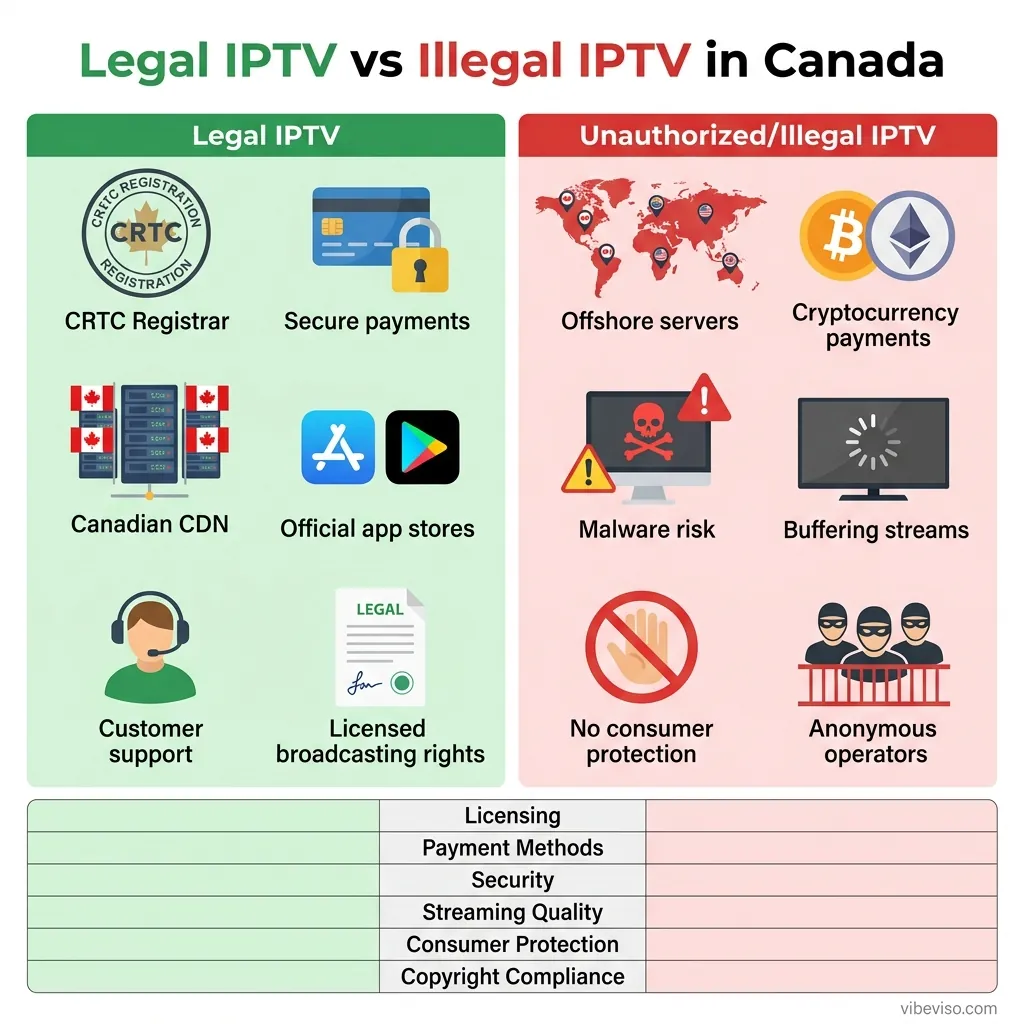
Distinguishing between a legal IPTV service and an unauthorized alternative can be difficult, as many pirate services utilize professional-looking web layouts, customer dashboards, and branded player apps. The differences, however, become clear when examining their operational and financial structures.
| Attribute | Legal IPTV (e.g., Bell, Rogers, VMedia, RiverTV) | Unauthorized / Grey-Market IPTV |
|---|---|---|
| Regulatory Status | CRTC-licensed BDU or exempt under CRTC 2017-320 | Unregistered; operates outside Canadian law |
| Carriage Rights | Formal, paid licensing contracts with broadcasters | Retransmits signals without copyright permission |
| Pricing Structure | Market rates (16.99to110+/month) | Low subscription fees (5to20/month) |
| Channel Catalog | Local Canadian channels + licensed international feeds | “30,000+ channels” including premium sports |
| Tax Collection | Mandatory GST/HST collected at checkout | No sales tax collected |
| Payment Options | Credit card, direct debit, pre-authorized bank pay | Crypto, PayPal “Friends & Family”, E-Transfers |
| Consumer Protection | Subject to CCTS mediation and refund rules | No refund recourse; exit scams are common |
| App Store Availability | Hosted on official Google, Apple, and Roku stores | Requires side-loading APK files from third-party sites |
| Network Infrastructure | Canadian CDN servers with ISP peering | Offshore hosting providers in uncooperative nations |
5 Red Flags of an Unauthorized IPTV Provider
- Suspect Pricing and Channel Lists: If a provider offers premium channels, pay-per-view events, and international channels for under $20 per month, it is unlicensed. Licensing fees alone for a single premium sports channel exceed this amount.
- Hidden Payment Routing: If the checkout process requires sending E-Transfers to a personal Gmail account, paying via Bitcoin, or using third-party payment links labeled as “donation” or “web hosting services,” it is designed to evade financial tracking.
- No Sales Tax Charged: Under Canadian tax law, any business selling digital services to Canadian residents must collect GST/HST. Unlicensed providers do not charge tax, as doing so would require registering their corporate entities with the Canada Revenue Agency (CRA).
- No Customer Service Recourse: Unauthorized services do not provide a phone number, physical address, or corporate name. If the service stops working or shuts down, you cannot recover your money.
- Requirements to Disable Security Features: If the setup instructions require you to disable security protocols, enable “unknown sources” on your device to install an unverified application, or turn off your antivirus software, the software may contain malware.
💬 People Also Ask: Is it illegal to use a grey-market IPTV service in Canada?
While Canadian law historically targeted the distributors and sellers of unauthorized streams, copyright holders are increasingly using civil court actions to identify and block the networks used by end-users. Accessing illegal streams also exposes your home network to significant security risks.
→ Verify your IPTV setup safety guidelines — how to configure a secure, compliant BYOM player environment.
The Legal Risks of Unlicensed IPTV in Canada
⚡ Quick Answer: Unlicensed IPTV carry significant legal risks under the Copyright Act, including civil liability for copyright infringement. Additionally, Federal Court site-blocking orders actively block unauthorized sports feeds in real-time, while side-loaded IPTV apps expose users to security vulnerabilities.
The legal landscape in Canada has shifted significantly over the past five years. Rights holders and telecommunications companies have moved away from targeting individual viewers with copyright notices. Instead, they are using civil litigation and technological blocking to dismantle the infrastructure of unlicensed providers.
Federal Court Dynamic Site-Blocking Orders
The most significant development in Canadian copyright enforcement is the introduction of dynamic site-blocking orders. In the landmark case Rogers Media Inc. et al. v. John Doe 1 et al. (2024 FC 1082), the Federal Court issued a wide-reaching dynamic blocking order to protect live broadcasts of major sports leagues:
- Real-Time IP Address Capture: During live broadcasts of the NHL, NBA, and Premier League, rights holders use monitoring systems (managed by firms like Friend MTS) to identify the server IP addresses hosting pirate streams.
- Mandatory ISP Action: The court order compels major Canadian ISPs—including Bell, Rogers, Telus, Videotron, TekSavvy, and Cogeco—to block these IP addresses at the network layer within minutes of receiving the notification.
- Two-Year Duration with Expansion Clause: The order remains in effect for two years and includes provisions allowing rights holders to add new sports properties (such as the FIFA World Cup 2026) to the blocking list without filing a new lawsuit.
For the end-user, this means that unauthorized streams will freeze or buffer during major live broadcasts. The block is applied at the ISP level and is event-scoped, meaning the server becomes accessible again shortly after the broadcast ends.
[Infringing Server IP] ──> Identified by Monitor ──> Sent to ISP ──> ISP Blocks IP ──> Stream FreezesThe Copyright Act and the Notice-and-Notice System
Under Section 41.25 of the Canadian Copyright Act (R.S.C., 1985, c. C-42), copyright holders can send notices of alleged infringement to ISPs. The ISP is legally required to forward these notices to the subscriber associated with the IP address.
- No Settlement Demands Allowed: Under amendments passed in 2018, copyright notices are legally prohibited from containing settlement demands, payment requests, or links to payment sites. If you receive a notice demanding payment to avoid a lawsuit, that request is non-compliant, and you have no legal obligation to pay it.
- Statutory Damages Limit: For non-commercial infringement (such as watching a stream for personal use), Section 38.1 of the Copyright Act caps statutory damages between 100and5,000 for all infringements in a single proceeding. However, if you host a server, rebroadcast feeds, or resell subscriptions, you are classified as a commercial infringer, and damages can reach tens of thousands of dollars per title.
Cybersecurity Risks of Side-Loaded IPTV Applications
Because unlicensed IPTV providers cannot host their apps on the official Google Play Store or Apple App Store, they instruct users to download Android application packages (APKs) from third-party websites. This process, known as side-loading, bypasses the security screening systems built into modern operating systems:
- Built-in Malware and Spyware: Security audits of popular unofficial IPTV apps have found hidden trojans, keyloggers, and botnet code designed to harvest passwords, search local networks, and use your device’s processing power to mine cryptocurrency.
- Financial Fraud: Entering your credit card number, email address, and passwords into an unlicensed provider’s website puts your data at risk. These databases are frequently hacked, sold on dark web marketplaces, or used for unauthorized recurring charges.
💬 People Also Ask: Is it safe to use free IPTV apps in Canada?
Most free or side-loaded IPTV player apps found on file-sharing sites are unverified. They can serve as vectors for malware. Legitimate player software (like Vibe Viso) is hosted on official stores and contains no malicious code.
What Are the Legal IPTV Service Providers in Canada?
⚡ Quick Answer: Legal IPTV in Canada is available through major telecom BDUs like Bell Fibe TV, Rogers Xfinity TV, Telus Optik TV, and Videotron Helix, or through independent OTT platforms like RiverTV and VMedia. These services are fully compliant with CRTC regulations.
For Canadian cord-cutters looking to maintain legal compliance while reducing costs, there are several licensed IPTV options available. These services are divided into two main categories: telecom-provided managed IPTV and independent Over-the-Top (OTT) platforms.
Major Telecom Providers
Bell Fibe TV
Bell delivers its premium television service over its private FTTH network using IP multicast technology. Fibe TV supports 4K HDR streams, cloud PVR recording, and interactive features like “Restart TV” (which lets you restart a live show already in progress).
NOTE
On January 29, 2026, Bell retired standalone app-only registrations for new customers. The Fibe TV App is now bundled under the “Equipment-Free Fibe TV” brand, requiring subscribers to pair the service with a Bell Fibe Internet package.
Rogers Xfinity TV
In 2026, Rogers rebranded its Ignite TV platform to Rogers Xfinity TV through an expanded partnership with Comcast. Running on Rogers’ hybrid fiber-coaxial (HFC) and FTTH networks, Xfinity TV offers 4K support, a 200-hour cloud DVR, voice control, and integration with streaming services like Disney+ and Netflix. While TV-only packages are available, Rogers requires renting their Xfinity Gateway to deliver the closed IPTV feed.
Telus Optik TV
Serving western Canada (Alberta and British Columbia), Telus Optik TV uses IP multicast over Telus’s PureFibre network. It provides 4K streaming, cloud recording, and customizable theme packs. Telus operates under strict net neutrality guidelines, ensuring that IPTV stream delivery does not throttle other home internet traffic on fiber connections.
Videotron Helix
Dominating the Quebec market, Videotron’s Helix platform uses an IP-based coaxial-fiber hybrid system. It features an AI-powered voice remote, personalized content recommendation engines, and full integration with Videotron’s Helix Internet gateways.
Independent OTT Providers
If you want to watch live TV without being tied to a specific internet service provider (ISP), independent OTT platforms offer nationwide coverage over any high-speed internet connection.
| Provider | Internet Required | Starting Price (CAD) | Compatible Devices | Key Feature |
|---|---|---|---|---|
| RiverTV | No (Works on any ISP) | $16.99/month | Apple TV, Roku, Fire TV, Android TV, iOS, Android, Web | The first Canadian virtual BDU (vMVPD); contract-free nationwide streaming. |
| VMedia TV | Yes (VMedia Internet) | $50.00/month | VBox receiver, Apple TV, Fire TV, Roku, Android TV | Customizable “Skinny Basic” and themed Flex packs; owned by Quebecor. |
| TekSavvy TV | Yes (TekSavvy Internet) | $25.00/month | Apple TV, Fire TV, Android TV, TekSavvy TV Box | Contract-free, supports cloud PVR add-ons and local channels. |
| Cogeco EPICO | Yes (Cogeco Internet) | $30.00/month (bundled) | EPICO 4K Box | Merges IPTV channels with Android TV app store access. |
| Eastlink TV | Yes (Eastlink Internet) | $90.00/month (bundled) | TiVo Stream Receiver | Multi-screen viewing with 350 hours of cloud PVR storage. |
For viewers seeking a fully legal, nationwide service that does not require an internet package bundle, RiverTV remains the primary independent choice.
💬 People Also Ask: How do I know if an IPTV service is legal in Canada?
Look up the provider on the CRTC’s public list of licensed undertakings, check if they collect Canadian sales tax, verify they don’t accept cryptocurrency, and confirm their app is available on the official Google and Apple app stores.
→ Check Vibe Viso’s IPTV pricing guide for Canada — an in-depth breakdown of legal packages, channels, and hardware costs.
Pros and Cons of IPTV in Canada
⚡ Quick Answer: IPTV’s pros include lower monthly costs, multi-device support, and cloud recording. Its cons include dependency on a stable internet connection, potential buffering during peak hours, and legal risks if using unauthorized offshore providers.
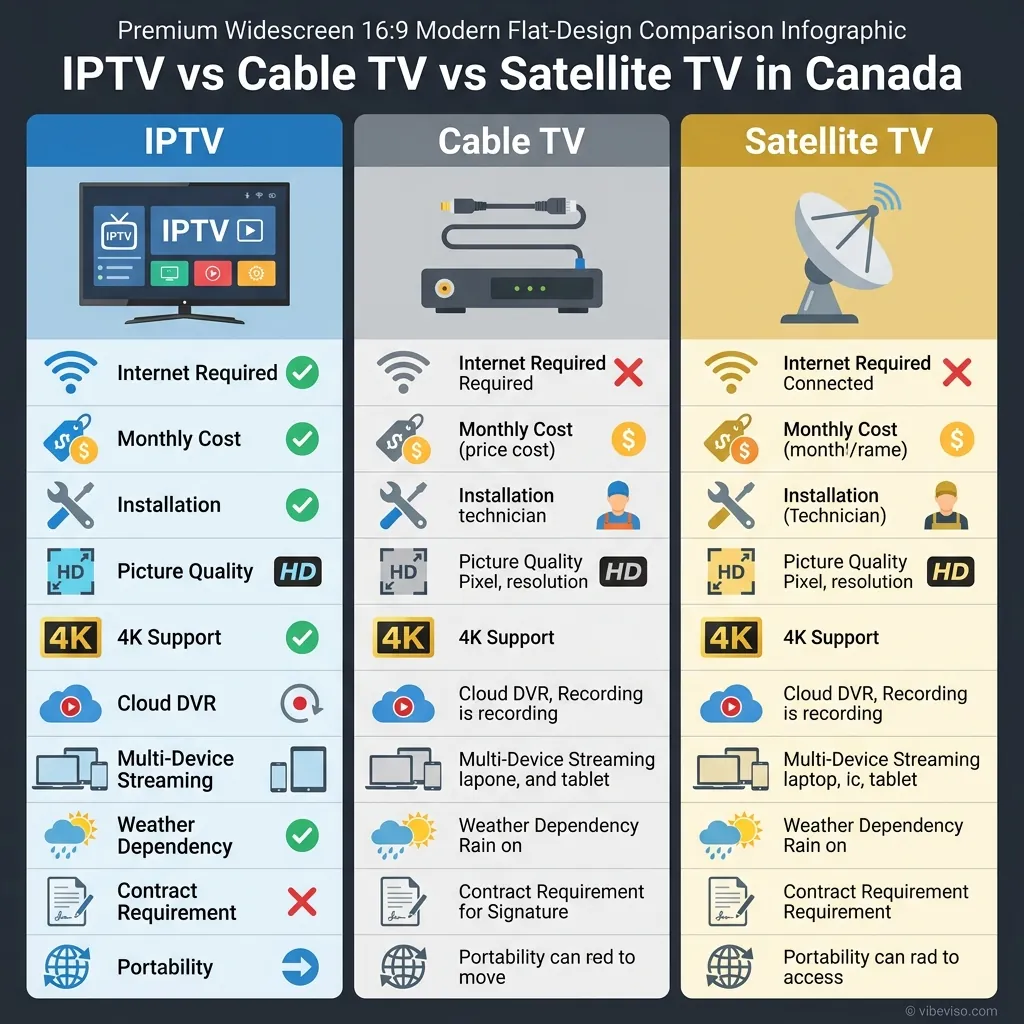
Advantages of IPTV for Canadian Viewers
- Significant Cost Savings: Traditional cable packages frequently exceed 120permonth.LegalOTToptions(likeRiverTVat16.99/mo) or BYOM setups using players like Vibe Viso paired with licensed playlists can reduce television expenses by up to 73%, saving households an average of $1,200 annually.
- Multi-Device Support: Unlike legacy cable, which requires renting a physical box for every TV in the house, IPTV apps run natively on smart TVs, streaming sticks, tablets, and phones. Most providers support 2 to 5 concurrent streams under a single account.
- On-Demand and Time-Shifted Features: Cloud PVR systems, 72-hour catch-up guides, and on-demand libraries let viewers watch content on their own schedule rather than adapting to broadcast air times.
- No Contracts or Installation Appointments: Most independent IPTV services operate on month-to-month billing cycles, allowing you to cancel or change packages at any time without early termination fees.
- Flexible Channel Curation: Bring Your Own Media players like Vibe Viso allow users to load custom M3U playlists, letting you arrange, filter, and organize only the channels you actually watch.
Disadvantages of IPTV for Canadian Viewers
- Broadband Dependency: Because IPTV streams are delivered over your internet connection, any bandwidth drops, router congestion, or ISP outages will cause buffering or take down your TV service entirely.
- Dynamic Site-Blocking Injunctions: Viewers using unlicensed, grey-market IPTV services face real-time stream cuts during major live sports events (NHL, NBA, Premier League) due to court-ordered ISP blocking.
- Security Risks with Unofficial Software: Side-loaded IPTV APK files bypass app store security filters and frequently contain malware, putting your home network and personal data at risk.
- Technical Configuration Required: Setting up a BYOM player (importing M3U lists, configuring XMLTV guide URLs, adjusting buffer sizes) requires a level of technical comfort that plug-and-play cable boxes do not.
- Varying Support Options: Many budget or unlicensed IPTV services have no customer support line or email. If the server goes offline, you have no recourse to recover lost subscription fees.
IPTV vs. Cable vs. Satellite — Feature Comparison
| Factor | Legal IPTV (BYOM + Vibe Viso) | Coaxial Cable (Rogers/Bell) | Satellite TV (Bell ExpressVu) |
|---|---|---|---|
| Average Monthly Cost | 17–110 | 80–180 | 60–130 |
| 4K Support | ✅ Yes (25+ Mbps required) | ⚠️ Limited | ⚠️ Limited |
| Live Sports Reliability | ✅ High (on legal streams) | ✅ Very High | ⚠️ Weather-dependent |
| Contract Required | ❌ No (usually month-to-month) | ✅ Yes (often 2 years) | ✅ Yes (often 2 years) |
| Installation Complexity | ⚠️ Moderate (software setup) | ✅ Simple (box connection) | ⚠️ High (dish alignment) |
| Multi-Device Support | ✅ Yes (2–5 screens) | ❌ No (requires extra boxes) | ❌ No (requires extra receivers) |
| Internet Required | ✅ Yes | ❌ No | ❌ No |
| Consumer Protection | ✅ Yes (CCTS/CRTC) | ✅ Yes (CCTS/CRTC) | ✅ Yes (CCTS/CRTC) |
💬 People Also Ask: Is IPTV worth it in Canada compared to cable?
For most users with high-speed internet, yes. The savings are massive, you get flexibility with no contracts, and you can watch on any device without box fees.
Do I Need a VPN for IPTV in Canada?
⚡ Quick Answer: You do not need a VPN for legal, CRTC-licensed IPTV services. However, a VPN is often used with third-party services to bypass ISP traffic management, route around dynamic site blocks, and encrypt traffic from network-level snooping.
For users of legal Canadian services (like RiverTV, Crave, or Bell Fibe TV), a Virtual Private Network (VPN) is not required. These services operate within Canada, use local CDN networks, and are not targeted by site-blocking orders.
ISP Traffic Shaping and Net Neutrality in Canada
Under the CRTC’s Telecom Regulatory Policy CRTC 2009-657, Canadian wireline ISPs are prohibited from using network-level throttling to slow down specific protocols or applications (such as video streaming) on home internet connections.
However, mobile networks operate under different rules. Major carriers (Rogers, Bell, Telus) use Internet Traffic Management Practices (ITMPs) on their cellular networks. On many budget or unlimited mobile plans, carriers restrict video stream bandwidth to 3 Mbps (480p SD resolution) over LTE and 5G networks. A VPN encrypts your traffic, preventing the mobile carrier’s deep packet inspection (DPI) systems from identifying the data as video stream packets, allowing you to stream in full resolution.
How a VPN Bypasses Court-Ordered Dynamic Blocks
When a dynamic site-blocking order is executed, Canadian ISPs block traffic directed to specific pirate server IP addresses.
When you use a VPN, your streaming device establishes an encrypted tunnel to a secure VPN server. Your ISP’s routers can only see that you are sending and receiving encrypted data from the VPN server’s IP address; they cannot see the final destination IP of the IPTV server. As a result, the ISP’s automated blocking filters are bypassed, allowing the stream to load.
[Device] ──(Encrypted Tunnel)──> [VPN Server] ──> [IPTV Server] (ISP cannot see destination)WireGuard vs. OpenVPN for IPTV Streaming
If you choose to use a VPN for streaming, selecting the right protocol is critical for performance:
- WireGuard: The recommended protocol for live IPTV. WireGuard is a modern, lightweight protocol that uses efficient cryptography. It has significantly less processing overhead than older protocols, resulting in lower latency (2–5 ms overhead), higher throughput, and faster reconnection times if your Wi-Fi signal drops briefly.
- OpenVPN: An older, heavier protocol. While highly secure, its large codebase introduces higher latency (10–30 ms overhead) and consumes more CPU resources on streaming sticks, which can lead to thermal throttling and buffering on low-power devices like Firesticks.
Configuring Public DNS to Bypass DNS-Level Filtering
Some basic content blocking in Canada is performed at the DNS (Domain Name System) level, where the ISP’s DNS servers refuse to translate a pirate domain name into an IP address. You can bypass DNS-level blocks without using a VPN by switching your router or device DNS settings to a public resolver:
- Open your router’s administration panel (usually
192.168.1.1or192.168.0.1). - Navigate to WAN Settings or DNS Configuration.
- Replace your ISP’s default DNS servers with:
- Cloudflare DNS:
1.1.1.1(Primary) and1.0.0.1(Secondary) - Google DNS:
8.8.8.8(Primary) and8.8.4.4(Secondary)
- Cloudflare DNS:
- Save the settings and reboot your router.
While this bypasses basic domain blocks, it will not prevent the IP-layer dynamic blocking orders used during live sports broadcasts.
💬 People Also Ask: Will a VPN fix IPTV buffering in Canada?
A VPN will only fix buffering if your ISP is throttling your connection or if there is severe routing congestion. If the buffering is caused by low internet speeds or an overloaded IPTV server, a VPN will not resolve it.
Why Is My IPTV Buffering in Canada?
⚡ Quick Answer: IPTV buffering is typically caused by insufficient local bandwidth, high network jitter, weak Wi-Fi signals, outdated streaming hardware, or server-side congestion. Check your connection speed, use an Ethernet cable, and increase your player app’s buffer size to resolve it.
Buffering occurs when your player application runs out of video data in its local memory (cache) and must pause playback to wait for more packets to download.
Bandwidth Requirements by Resolution
To prevent buffering, your internet connection must deliver a sustained download speed that exceeds the bitrate of the stream. For home networks with multiple connected devices, you can calculate your required bandwidth using this formula:
The 30% overhead factor accounts for normal network traffic spikes, smart home devices, and background updates.
| Resolution | Recommended Stream Bitrate | Minimum ISP Speed | Recommended Speed (with Overhead) |
|---|---|---|---|
| SD (480p) | 1.5 – 2.0 Mbps | 3.0 Mbps | 5.0 Mbps |
| HD (720p / 1080p) | 4.0 – 8.0 Mbps | 10.0 Mbps | 15.0 – 25.0 Mbps |
| 4K UHD (2160p) | 15.0 – 25.0 Mbps | 30.0 Mbps | 50.0+ Mbps |
If you have three TVs streaming Full HD content simultaneously, your network requires:
of dedicated, unthrottled bandwidth to prevent buffer wheels on all screens.
Latency and Jitter Tolerances
Speed is not the only metric that matters for live television. Live streams are highly sensitive to timing:
- Ping (Latency): The time it takes for a data packet to travel from your device to the IPTV server and back. For a stable stream, target a ping below 50 ms. Latencies above 120 ms will cause slow channel-zapping times and delay the start of streams.
- Jitter: The variation in packet arrival times. If packets arrive out of order or at irregular intervals, your player cannot decode them in real-time, resulting in dropped frames and audio desync. Jitter must remain below 30 ms for smooth playback.
5-Step Buffering Troubleshooting Playbook
- Switch from Wi-Fi to Ethernet: The 2.4 GHz Wi-Fi band is prone to interference from household appliances, baby monitors, and neighbors’ routers. Connecting your streaming box directly to your router with a CAT6 Ethernet cable removes wireless interference.
- Configure Public DNS Resolver: Swap your ISP’s default DNS servers for Cloudflare (
1.1.1.1) or Google (8.8.8.8) in your router settings to reduce domain lookup latency. - Adjust Player Buffer Settings: In player applications like TiviMate or Vibe Viso, navigate to Settings → Player and change the Buffer Size from “Small” to “Medium” or “Large.” This instructs the app to download more seconds of video before starting playback, helping absorb network spikes.
- Perform a Router Power Cycle: Consumer routers accumulate temporary state tables that can degrade performance over time. Unplug your router’s power cable, wait 30 seconds, plug it back in, and let it restart to clear the memory.
- Enable Hardware Video Decoding: Under your player app’s settings, ensure that Hardware Decoding is active. This offloads the video decompression workload from the device’s main CPU to its dedicated graphics chip, preventing lag caused by device overheating.
💬 People Also Ask: Why does my IPTV buffer only on weekends?
Weekend evenings are peak traffic times. Thousands of viewers tuning in to watch live sports or prime-time shows can overload the servers of lower-cost or unlicensed providers, leading to server-side buffering.
→ Read our troubleshooting guide for Firestick IPTV buffering — step-by-step optimization settings for Amazon devices.
What Hardware Do You Need for IPTV in Canada?
⚡ Quick Answer: You need three hardware elements: a high-speed internet connection, a streaming device (such as a Firestick, Apple TV, or Android TV box), and a compatible television or display monitor. A dedicated Ethernet adapter is recommended for 4K streaming.
Choosing the right hardware is critical for ensuring smooth UI navigation, fast channel zapping, and long-term software compatibility.
IPTV Hardware Comparison
| Device | Operating System | Price Range (CAD) | Best For | IPTV App Compatibility |
|---|---|---|---|---|
| Formuler Z11 Pro Max | Android (Custom) | 220–260 | Power users seeking a traditional cable-box experience | Excellent (Features native MYTVOnline 3 app) |
| Nvidia Shield TV Pro | Android TV | 250–280 | High-end home theaters; features AI upscaling | Excellent (Full Google Play Store access) |
| Apple TV 4K (3rd Gen) | tvOS | 179–199 | Users already inside the Apple device ecosystem | Great (Supports Vibe Viso, GSE, iPlayTV) |
| Amazon Fire TV Stick 4K Max | Fire OS | 70–90 | Budget-conscious cord-cutters | Great (Requires side-loading for some apps) |
| Chromecast with Google TV | Android TV | 40–70 | Casual viewers looking for simple UI | Great (Full Google Play Store access) |
| MAG 540 (Infomir) | Linux | 130–150 | Dedicated TV rooms; uses MAC portal interfaces | Good (Locked to Stalker/Ministra portals) |
The Three Hardware Requirements
- A Reliable Streaming Device: While many smart TVs (Samsung Tizen, LG webOS) feature basic IPTV apps, their built-in processors are often slow and receive limited software updates. Using a dedicated streaming stick (like a Firestick 4K Max or Apple TV) ensures a smoother user experience.
- Fast Home Networking: Connect your streaming device via a wired Ethernet cable. If you must use Wi-Fi, ensure your device is connected to the 5 GHz band of a Wi-Fi 6 or Wi-Fi 6E router, and that the signal strength is strong.
- The Proper Input Device: If you prefer using number keys to change channels (like traditional cable), look for streaming devices that support dedicated remote controls with numeric keypads (such as the Formuler series).
💬 People Also Ask: Can I use IPTV on a regular smart TV without a box?
Yes, but built-in smart TV processors are often underpowered, leading to slow menu navigation and audio/video sync issues. A dedicated streaming device (like a Firestick or Apple TV) is highly recommended.
Setting Up IPTV with Vibe Viso: The Legal BYOM Player
⚡ Quick Answer: Vibe Viso is a Bring Your Own Media (BYOM) player app. It is entirely legal because it contains no content streams. You set it up by installing the app, inputting your licensed provider’s M3U link or Xtream credentials, and linking an XMLTV EPG schedule.
Vibe Viso operates on a Bring Your Own Media (BYOM) architecture. The application does not host, distribute, or sell any content streams or television channels. It is a software client—similar to an email program or a web browser—designed to play media files that the user provides. This software-only model means Vibe Viso is fully legal, complies with Canadian copyright laws, is not subject to CRTC BDU licensing, and is safe to download from official application stores.
Step 1: Install Vibe Viso on Your Device
Open the official app store on your device (Google Play Store, Apple App Store, or the Amazon Appstore), search for Vibe Viso, and install the application. For manual downloads and installation files, visit iptv setup guide
Step 2: Retrieve Your Credentials from a Licensed Provider
Log into the customer portal of your CRTC-registered IPTV provider and copy either your M3U Playlist URL or your Xtream Codes API details (Server URL, Username, and Password).
CAUTION
If your provider is not registered with the CRTC, do not import their credentials. Loading unauthorized streams into your player exposes your connection to Federal Court IP blocking and potential security risks.
Step 3: Add the Playlist to Vibe Viso
Launch the Vibe Viso app on your streaming device:
- Select Add New Playlist.
- Choose your input method: M3U Link or Xtream Codes API.
- Enter a name for the playlist (e.g., “My Canadian IPTV”).
- Paste the playlist URL or enter the API credentials exactly as provided.
- Click Connect. Vibe Viso will connect to the server, download the channel index, and organize them into categories automatically.
Step 4: Configure Your XMLTV Electronic Program Guide (EPG)
To populate the interactive TV guide grid:
- Navigate to Settings → EPG Settings.
- Click Add EPG Source.
- Paste the XMLTV URL provided by your licensed service provider.
- Save the settings. Vibe Viso will sync the schedule data, attaching channel logos, show descriptions, and start times to your channel list.
Step 5: Adjust Playback and Buffer Settings
To optimize Vibe Viso for your home network:
- Navigate to Settings → Playback Engine.
- Set the Buffer Size to Medium (recommended for typical Canadian cable and fiber connections). If you use a high-speed fiber connection like Telus PureFibre, you can set this to Small to speed up channel zapping.
- Turn on Hardware Decoding to offload video decompression to your device’s graphics processing unit.
- Save all changes and return to the home screen. Your setup is now complete.
💬 People Also Ask: Does Vibe Viso work on my TV device?
Yes, Vibe Viso is compatible with Android TV, Google TV, Amazon Fire OS, iOS, tvOS, and mobile devices, providing a unified streaming interface across all platforms.
→ Start your Vibe Viso free trial today — download the application and configure your media streams in minutes.
The Future of IPTV in Canada
⚡ Quick Answer: The future of Canadian IPTV will be defined by 5G Fixed Wireless Access expansion, the adoption of the efficient AV1 video codec, AI-driven content categorization, and cloud-based interactive television workflows.
The Canadian television market in 2026 is undergoing significant technical updates driven by changes in network infrastructure and software capabilities.
5G Fixed Wireless Access (FWA) Expansion
Telecommunications companies are expanding their 5G Home Internet products using Fixed Wireless Access (FWA). 5G FWA delivers broadband download speeds of 300 to 1,000 Mbps with latencies below 20 ms. This enables households in rural and suburban communities—where physical fiber installation is not cost-effective—to access high-bitrate 4K IPTV streams without buffering, reducing the digital divide in Canadian television distribution.
AI-Driven Content Categorization and Smart UIs
Modern IPTV player platforms are integrating artificial intelligence features to simplify UI navigation:
- Semantic Content Categorization: Rather than sorting through a static list of thousands of international channels, AI algorithms analyze your viewing habits to group relevant sports, news, and movies on your home screen.
- Dynamic Interface Generation: Interfaces can adapt in real-time based on the time of day, active user profiles, and trending regional events (e.g., displaying local news channels on the home screen during winter storm alerts).
Widespread Adoption of the AV1 Codec
The AV1 (AOMedia Video 1) codec is replacing older compression standards (like H.264 and H.265/HEVC). Developed by the Alliance for Open Media, AV1 is a royalty-free codec that offers 30% to 50% better compression efficiency than H.265 without loss of image quality.
For Canadian viewers, this means streaming 4K HDR video requires a sustained bandwidth of only 8 to 12 Mbps instead of the current 25+ Mbps requirement. This directly benefits households with lower-tier internet packages or those streaming over mobile connections.
Cloud-Based DVR and Live-to-VOD Workflows
Modern IPTV providers are shifting their video recording infrastructure entirely to the cloud. Instead of saving recorded shows to a local hard drive on a set-top box, recordings are stored in secure cloud data centers. AI-enabled indexing systems can automatically flag commercial breaks, generate instant highlight reels for live sports, and index broadcasts for search engines—bridging the gap between traditional live television and modern on-demand streaming platforms.
💬 People Also Ask: Can AI improve my IPTV interface?
Yes, newer apps utilize local AI engines to auto-tag channels, suggest sports broadcasts based on your interests, and even adjust streaming buffers dynamically during network fluctuations.
→ Learn about the Vibe Viso IPTV reseller program — build, brand, and scale compliant IPTV applications for Canadian business clients.
IPTV in Canada: Frequently Asked Questions
Can I use Vibe Viso to watch live TV legally?
Yes. Vibe Viso is a legal media player application that does not include, bundle, or sell any content streams. When you load a playlist or login credentials from a CRTC-licensed Canadian IPTV provider, you can legally watch live TV, access EPG program guides, and use recording features. The legality of your setup depends entirely on your stream provider.
Is downloading an IPTV player APK legal in Canada?
Yes. Installing an IPTV player application (such as Vibe Viso or TiviMate) via an APK file is legal. The software itself is a media player, which is not restricted under Canadian copyright law. You must, however, ensure you source your stream playlists from authorized distributors to maintain legal compliance.
Why does my IPTV only freeze during NHL and NBA games?
This is caused by Federal Court dynamic IP blocking orders (Rogers Media v. John Doe, 2024 FC 1082) rather than ISP traffic throttling. Rights holders identify the server IP addresses hosting unauthorized sports streams in real-time during live games and compel ISPs to block them. Using a legal Canadian streaming service resolves this issue.
What is the cheapest legal IPTV service in Canada?
As of 2026, RiverTV is the most affordable legal IPTV option in Canada. Starting at $16.99 per month, it offers over 40 live channels with no contract, no ISP bundling requirements, and works over any high-speed Canadian internet connection.
Do I need a set-top box for IPTV in Canada?
No. While traditional telecom services (like Bell or Rogers) prefer to lease proprietary set-top boxes, most independent providers and BYOM players like Vibe Viso run directly as software applications on smart TVs, Firesticks, Apple TVs, tablets, and phones.
How do I know if an IPTV service is legal in Canada?
Check if the service provider is listed in the CRTC’s public database of licensed Broadcasting Distribution Undertakings (BDUs). Legal services typically operate under recognizable brand names, collect GST/HST at checkout, accept credit card payments, and do not offer “thousands of premium channels for $10.”
What is an M3U playlist and where do I get one legally?
An M3U playlist is a text file or URL that indexes stream links for media player apps. You get a legal M3U playlist directly from your registered, licensed IPTV provider’s customer dashboard. Sourcing public M3U lists from forums or grey-market sites violates copyright standards.
Is IPTV available in rural Canada?
Yes, provided you have a broadband internet connection of 10 Mbps or higher. While satellite TV was historically the primary choice for rural communities, the expansion of Starlink and 5G Fixed Wireless Access (FWA) has made high-speed internet-based IPTV accessible across rural Canada.
Can my Canadian ISP see that I am watching IPTV?
Your ISP can see the data volume, packet types, and the server IP addresses you connect to. If you stream over a legal service, they see connections to recognized Canadian CDN edge servers. If you use a VPN, all traffic is encrypted, and your ISP can only see that you are connected to a VPN server.
What is the difference between IPTV and OTT streaming?
IPTV typically focuses on delivering live, scheduled television channels with program guides, often using managed ISP networks (multicast). OTT (Over-the-Top) streaming refers to on-demand video services (like Netflix or Disney+) delivered over the public, unmanaged internet (unicast).
Can I watch local Canadian TV channels on IPTV?
Yes. Under CRTC regulations, all licensed Canadian BDUs must include local programming (such as CBC, CTV, Global, and Citytv) in their basic channel packages. Independent platforms like RiverTV also include local broadcast feeds in their subscriptions.
Does Vibe Viso work on Apple TV and Amazon Fire TV?
Yes. Vibe Viso is designed for cross-platform compatibility and is available for download on Apple TV (tvOS), Amazon Fire TV devices (Fire OS), Android TV/Google TV devices, and mobile platforms (iOS and Android).