
A reliable IPTV subscription in Canada typically costs 13–20 CAD per month per connection, supports major devices like Fire TV Stick, Android TV, and Smart TVs through an app such as IPTV Smarters Pro or TiviMate, and is transparent about pricing, trial terms, and support. Avoid services priced far below that range or vague about what they offer, both are common warning signs.
If you’ve searched for an IPTV subscription in Canada, you’ve probably noticed the same pattern: every provider claims to be the best, the most reliable, and the cheapest, often in the same sentence. Some list channels count in the tens of thousands with no way to verify them. Others use countdown timers and “limited spots” language that has nothing to do with how streaming actually works. None of that tells you whether the service will still work in three months.
This guide skips the sales language and walks through what actually determines whether an IPTV subscription in Canada holds up: the legal landscape you’re operating in, what a fair price looks like, which devices and apps matter, and the specific red flags that predict a bad experience before you pay for it.
IPTV as a technology is legal in Canada, it’s simply television delivered over an internet connection instead of cable or satellite wiring. The legal question that actually matters is whether the specific service you’re paying for has the rights to distribute the channels and content it’s offering. The Canadian Radio-television and Telecommunications Commission (CRTC) regulates broadcasting activity in Canada, and the Copyright Act governs who is allowed to distribute a given channel, film, or sporting event.
This distinction matters in practice. Canadian courts have already acted against unauthorized resellers: in Bell Canada v. L3D Distributing Inc. (2021), the Federal Court found the defendant liable for distributing unauthorized IPTV services and issued an injunction. Services offering hundreds of premium channels, including live sports and first-run movies, for a few dollars a month are the ones most likely to be operating without the rights to that content, and they’re the ones most likely to shut down abruptly or draw legal attention.
As a subscriber, you’re not expected to audit a provider’s licensing chain. But a provider’s pricing, transparency about what it offers, and willingness to answer direct questions about its service are reasonable proxies for how seriously it treats this.
Based on current market pricing, a single-connection IPTV subscription in Canada generally falls between $13 and $20 CAD per month, with multi-connection plans (two or more simultaneous streams) running higher. Annual plans usually bring the effective monthly cost down compared to paying month to month.
Prices well under that range. a common one is $5 to $8 per month, usually can’t cover the server infrastructure, content licensing, and support costs that a real service requires. That gap has to be made up somewhere, and it’s typically made up in reliability: overloaded servers, no real support team, or content sourced without proper rights.
At the other end, “premium” IPTV subscriptions priced dramatically higher than the market range aren’t automatically better, check what specifically justifies the price (more simultaneous connections, a larger VOD library, dedicated regional sports coverage) rather than taking “premium” as a claim on its own.
IPTV subscriptions are typically device-agnostic — the subscription itself is just a login, and you access it through an app on whatever device you already own. The devices Canadian households use most often are:
The app you use matters as much as the subscription itself, since it controls the day-to-day experience:
Ask any provider you’re considering which app they support and whether they provide setup instructions specific to your device. A provider that can only describe generic “works on all devices” without device-specific guidance is a sign their support won’t hold up when something breaks.
Channel count is the number most IPTV marketing pages lead with, and it’s also the easiest number to inflate, since it costs a provider nothing to list channels that duplicate content, rarely work, or aren’t legally available in Canada in the first place.
A more useful way to evaluate a subscription:
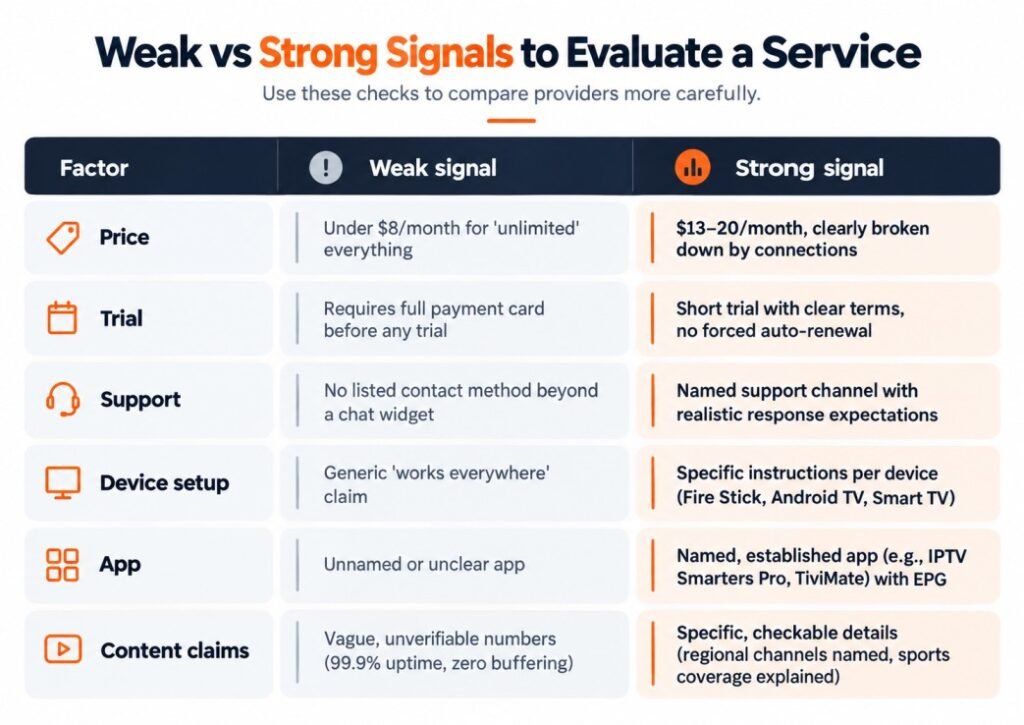
If a provider clears most of the “strong signal” column, it’s a reasonable candidate. If it leans heavily toward “weak signal,” treat the low price as a cost you’ll pay later in dropped streams or a service that disappears.
The fastest way to check everything covered in the decision framework above isn’t reading more reviews — it’s watching the service handle your own devices and your own viewing habits for a few days. A short trial shows you the things a sales page can’t: whether the stream holds up during a live game on your actual internet connection, whether the app feels right on the specific device you use most, and whether the channel lineup matches what you were told rather than what was advertised.
This only works if the trial itself passes the same test as the rest of the service. Look for the same signals from the table above: a clear time window, no requirement to hand over full payment details before you’ve watched anything, and no auto-renewal you didn’t agree to. VibeViso’s free trial is built around that, you can check device compatibility, sports stream stability, and the app experience on your own setup before deciding anything.
Consider a household that switches from a $140/month cable bundle to a $6/month IPTV service advertising “unlimited channels.” For the first few weeks, everything works. Then, during a high-traffic event like a playoff game, the stream buffers repeatedly while the cable alternative would not have. A few weeks later, the service goes offline entirely with no notice and no way to reach support.
This is a common pattern, not a rare exception. It happens because a service priced that far below market cost cannot fund the server capacity needed for peak demand, and often can’t fund a real support team either. The fix isn’t necessarily choosing the most expensive option, it’s applying the framework above before paying: checking the price against the realistic 13–20/month range, confirming device and app support, and looking for a support channel that responds before you’ve committed money.
An IPTV subscription in Canada is only as good as the details behind the marketing: realistic pricing, named apps and devices, transparent trial terms, and a support channel that exists before you pay. Channel counts and uptime percentages you can’t verify are the least useful things to base a decision on.
IPTV as a delivery technology is legal — the legality issue sits entirely with content rights, not the internet-based format. Canadian courts have already ruled on this directly: in the amended judgment in Bell Canada v. L3D Distributing Inc., the Federal Court ordered the defendants to pay damages for selling IPTV access to content they had no rights to distribute. That’s the line that separates a legitimate subscription from a risky one.
Not every IPTV provider needs a traditional broadcasting license, but some online streaming services fall under the CRTC’s registration requirements depending on their activities and Canadian revenue. Registration and content-licensing rights are two separate questions — a provider can be registered and still lack rights to specific channels, so registration alone isn’t proof of a clean service.
IPTV Smarters Pro sets up faster and works with almost any provider’s login or playlist link, which is why most Canadian providers default to it. TiviMate gives more control over the program guide layout and supports separate profiles per household member, but the useful features sit behind a one-time paid upgrade. If you’re setting this up for parents or a less technical household member, Smarters Pro is the lower-friction choice.
Live sports create the sharpest spike in simultaneous viewers a provider’s servers ever see, so any weakness in server capacity shows up first during exactly those broadcasts. A connection that streams movies fine all week can still buffer during a Saturday night game if the provider hasn’t built in enough capacity for peak sports traffic. This is a provider-side capacity issue far more often than a home internet issue.
Yes, but only if the plan you bought includes enough simultaneous connections for that — a single-connection plan lets you use any of those devices, just not more than one at a time. Trying to stream on two devices at once on a single-connection plan typically logs one of them out or blocks the second stream, not something the device itself is doing wrong.
A real trial gives you a short viewing window with clear expiry terms and doesn’t require full payment card details before you’ve tested anything. If an offer demands payment information upfront, doesn’t state how or when it converts to a paid plan, or pressures you with countdown-style urgency, treat it as a sign of a low-quality or unlicensed operator rather than a genuine trial.
Canadian enforcement action to date, including the L3D Distributing case, has targeted the businesses selling unauthorized access — not individual subscribers. That said, a shutdown still leaves you with an interrupted service, no refund path, and no support, which is a real practical risk even without personal legal exposure.
Installing an established, named app like IPTV Smarters Pro or TiviMate through the Fire TV app store or a verified developer link carries the same risk profile as any other streaming app. The malware risk shows up specifically with sideloaded APKs from unknown third-party sites bundled with a provider’s login credentials — that’s a sign to walk away from that particular provider, not a reason to avoid IPTV apps generally.
An EPG is the on-screen program guide showing what’s airing now and later across your channels, the same function as a cable guide. It matters more for Canadian lineups because regional feeds (CBC, CTV, and provincial sports coverage) shift scheduling by time zone, and a provider with a poorly maintained EPG often shows the wrong listings for your region even when the stream itself works fine.
No — a VPN doesn’t change whether a provider actually holds distribution rights to its content, so it isn’t a substitute for checking that in the first place. Some users add one for general privacy on shared or public networks, but a provider that suggests you need a VPN specifically to access their service is often signaling something about how that service is delivered that’s worth asking about directly.
Choosing an IPTV subscription in Canada comes down to the same handful of checks every time: realistic pricing, transparent trial terms, named devices and apps, and support you can verify before you pay. If you’re comparing options, VibeViso publishes its plan details, supported devices, and trial terms upfront, worth a look against the checklist in this guide.

VibeViso, is an IPTV streaming service serving Canada, with 8 years in the industry. He focuses on transparent pricing, real device compatibility, and helping Canadian households choose IPTV subscriptions based on facts rather than marketing claims.

+1 (902) 705-9412
Added to cart
Check out our shop to see what's available