

Vibe Viso IPTV Blog - Complete Streaming Guides, Setup Tutorials, Buffering Fixes & Expert Tips

Welcome to the Vibe Viso IPTV Blog, your complete destination for everything related to IPTV streaming, setup guides, troubleshooting solutions, and expert tips. Whether you are a beginner trying IPTV for the first time or an advanced user looking to optimize your streaming experience, this blog is designed to give you clear, practical, and step-by-step guidance.

  • Blog
IPTV Setup for Multicultural Communities Brampton

Brampton is buzzing — and not just because of its incredible food scene or vibrant festivals. Internet Protocol Television, better known as IPTV, has quietly become the go-to entertainment solution for thousands of families across this thriving city. If you...

Difference between IPTV Canada and traditional cable television setup

Why Canadians Are Switching to IPTV in 2026 ? IPTV Canada has become one of the fastest-growing entertainment solutions as more Canadians move away from traditional cable television and switch to internet-based streaming services. IPTV (Internet Protocol Television) allows users...
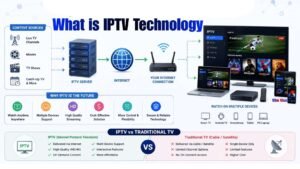
What Is IPTV Technology

What Is IPTV Technology? IPTV (Internet Protocol Television) is a system that delivers live TV channels, movies, series, and on-demand content through internet networks instead of traditional cable or satellite broadcasting. It allows users to stream television content directly on...

Read More Guides

End of Content.

Before You Start

3 things to check before setting up IPTV

1

Have your playlist URL ready

Your provider should have sent an M3U URL or Xtream Codes login (username + password + server). You need one of these before you can set anything up.

2

Use a wired connection if possible

Ethernet is always better than WiFi for IPTV. If you're on WiFi, make sure you're on 5 GHz, not 2.4 GHz — especially for HD and 4K streams.

3

Pick the right app for your device

TiviMate is the best option for Firestick and Android TV. IPTV Smarters works on everything. VLC is fine for occasional use on a laptop or phone.