
Why the Best Internet for IPTV Calgary Depends on More Than Raw Speed
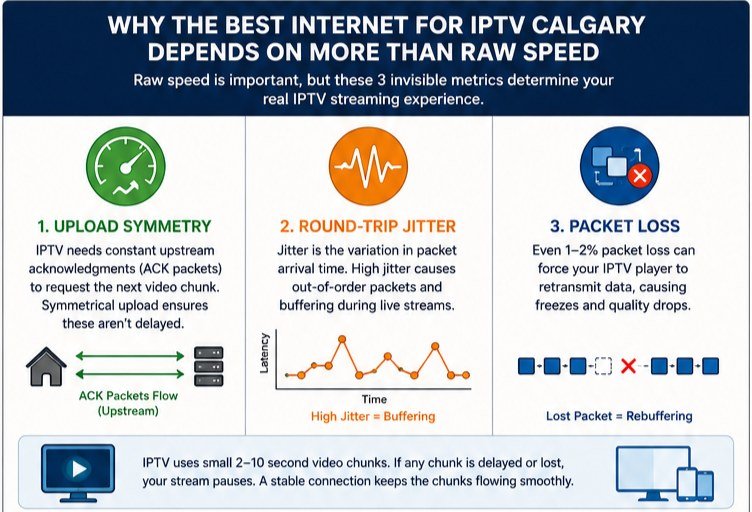
The best internet for IPTV Calgary homes is not simply the plan with the highest advertised bandwidth. Most households in Calgary can comfortably stream a single 4K channel on a 25 Mbps connection. The true performance bottleneck lies in three invisible metrics that speed test websites never measure: upload symmetry, round-trip jitter, and packet loss during peak-hour node congestion. Understanding how each of Calgary’s major networks handles these three factors is the foundation for choosing a connection that never buffers—even during a Flames overtime period on a Tuesday night in January.
IPTV protocol formats, primarily HTTP Live Streaming (HLS) and Dynamic Adaptive Streaming over HTTP (DASH), operate by chopping a live broadcast into small, sequential video chunks—typically 2 to 10 seconds of footage encoded as MPEG Transport Stream (.ts) or fragmented MP4 (.fMP4) files. Your streaming device must continuously request, download, and assemble these chunks in perfect chronological order with no delay. Unlike on-demand Netflix, which pre-buffers several minutes ahead, a live IPTV feed operates with a minimal buffer—often only 5 to 15 seconds—to keep you close to real time. If even one chunk is delayed by network congestion or jitter, your player pauses and the buffering wheel appears.
A premium Calgary IPTV service delivers thousands of live channels, but the quality you experience at home is determined entirely by your last-mile ISP network. This guide breaks down every major internet option in Calgary—from TELUS PureFibre XGS-PON to Rogers Ignite HFC to Moby Fiber—and gives you the technical knowledge to configure your router for a buffer-free viewing experience year-round.
TELUS PureFibre vs Rogers Ignite: Calgary’s Two Main Networks Head-to-Head
To make an informed decision, Calgary residents must understand the fundamental technology differences between the two dominant carriers in the city. While both TELUS and Rogers market premium, high-speed brands, the physical delivery mechanisms, routing behaviours, and peak-hour performance profiles of their networks are significantly different.
| Metric | TELUS PureFibre (XGS-PON) | Rogers Ignite (DOCSIS 3.1 HFC) | Moby Fiber (Dedicated FTTH) |
|---|---|---|---|
| Connection Type | Fiber-to-the-Home (FTTH) | Hybrid Fiber-Coaxial (HFC) | Dedicated Fiber-to-Suite |
| Download Speed | Up to 3 Gbps | Up to 1.5 Gbps | Up to 1 Gbps |
| Upload Speed | Up to 3 Gbps (symmetrical) | 50–100 Mbps (asymmetrical) | Up to 1 Gbps (symmetrical) |
| Peak-Hour Jitter | Very Low (<2 ms) | High (15–200 ms spike) | Ultra-Low (<1 ms) |
| Shared Medium? | Shared fiber splitter (32–64 homes) | Shared coaxial node (100–500 homes) | Dedicated per suite |
| VANIX Hop Count | 4–5 hops (<14 ms) | 10–15 hops (15–30 ms) | Direct (<12 ms) |
| IPTV Suitability | Excellent | Moderate (at off-peak hours) | Excellent |
| Neighbourhood Availability | Citywide (most areas) | Citywide (most areas) | Downtown/Inner-City Condos Only |
TELUS PureFibre: GPON vs. XGS-PON Architecture
TELUS’s PureFibre network uses a true fiber-to-the-home (FTTH) design. In older Calgary deployments, TELUS used GPON (Gigabit Passive Optical Network), which shares a single physical fiber strand from a neighbourhood splitter among up to 32 or 64 individual homes. A GPON link provides a shared downstream capacity of 2.488 Gbps and 1.244 Gbps upstream. During heavy evening usage—when dozens of households on the same splitter stream video simultaneously—the GPON link can experience transient congestion, causing minor latency increases for latency-sensitive IPTV traffic.
To address this, TELUS has upgraded large portions of its Calgary network to XGS-PON (10-Gigabit Symmetrical Passive Optical Network). XGS-PON delivers a shared capacity of 10 Gbps symmetrical on the same splitter, using wavelength division multiplexing (WDM) to transmit downstream data at 1577nm and upstream at 1270nm. This means each subscriber on an XGS-PON plan effectively has access to true, dedicated symmetrical gigabit speeds of up to 2.5 Gbps or 3 Gbps, with the upstream arm never choked by neighbouring users. For IPTV subscribers, this guarantees that TCP Acknowledgment (ACK) packets—which must travel upstream to confirm each received video chunk before the next one is sent—are never delayed by upload congestion.
If multiple people in your home upload simultaneously (cloud backups, video calls, security cameras), a symmetrical fiber connection absorbs all of this without affecting the IPTV acknowledgment stream. This is the core reason why XGS-PON TELUS PureFibre plans consistently outperform cable for live streaming during peak hours. Pairing this connection with recommended IPTV player apps ensures your software-side buffer management is equally optimized.
Rogers Ignite (Shaw HFC): Coaxial Jitter and Bufferbloat Explained
Following its acquisition of Shaw, Rogers rebranded the local cable network as Rogers Ignite. The Rogers network in Calgary uses Hybrid Fiber-Coaxial (HFC) technology: high-speed fiber runs to a localized neighbourhood optical node, but the final “last mile” from that node into each home is delivered over copper coaxial cable. Rogers uses the DOCSIS 3.1 standard and is trialling DOCSIS 4.0 in select markets. Although DOCSIS 3.1 supports download speeds of up to 1.5 Gbps, upload speeds are sharply limited—typically capped at 50 Mbps or 100 Mbps—making the connection fundamentally asymmetrical.
Because coaxial cable is a shared copper medium, every home on a local loop shares the same radio frequency spectrum. During high-demand events—such as when thousands of Calgary households simultaneously stream live matches on Sportsnet—the neighbourhood Cable Modem Termination System (CMTS) queues fill up rapidly. This causes a phenomenon called bufferbloat: as the router’s memory buffer fills with packets, round-trip latency spikes from a baseline of around 15ms to well over 200ms, and jitter—the variation in packet arrival times—increases dramatically. For live IPTV, high jitter is especially damaging. If an incoming video chunk is delayed by a jitter spike, the player exhausts its small buffer and freezes the stream.
Traceroute analysis of Calgary connections reveals a further routing disadvantage on Rogers. Packets from a Rogers HFC address often travel north to Edmonton or south through Seattle before reaching VANIX in Vancouver—adding 10 to 15 extra routing hops compared to TELUS’s direct 4-to-5-hop Western backbone path. Each additional hop is a potential point of congestion and packet loss under peak loads.
Direct-to-VANIX Peering: Why the Hop Count Matters
The Vancouver Internet Exchange (VANIX) is the primary hub in Western Canada where major ISPs, content delivery networks (CDNs), and IPTV host servers directly interconnect. The path your packets take from a Calgary home to VANIX—and then to the IPTV server’s edge node—is the single most important factor in stream stability, not the advertised gigabit headline speed.
TELUS PureFibre connections in Calgary travel directly to Vancouver via TELUS’s private Western Canadian fiber backbone crossing the Rockies, typically achieving under 14ms round-trip time (RTT) to VANIX. Rogers HFC connections can reach 25ms to 35ms RTT under load. For IPTV, the difference between 14ms and 35ms RTT may seem small, but at scale it determines whether your TCP ACK packets arrive in time for the server to send the next chunk before your player’s buffer runs dry.
Moby Fiber: Dedicated Gigabit for Downtown Calgary Condos
For residents in high-density multi-dwelling units (MDUs) and condominiums in Calgary’s inner city, Moby (getmoby.com) offers an independent local fiber alternative that bypasses the legacy infrastructure of TELUS and Rogers entirely. Moby builds its own dedicated fiber infrastructure directly into downtown buildings, serving the Beltline, Eau Claire, East Village, Downtown West End, and Bridgeland neighbourhoods.
Rather than using shared neighbourhood nodes, Moby runs high-capacity fiber lines directly into a building’s Main Distribution Frame (MDF) in the basement, then delivers dedicated fiber-optic lines or high-speed Active Ethernet directly into each suite. This means there is zero sharing bottleneck at the neighbourhood level. The bandwidth you subscribe to is dedicated to your unit, completely unaffected by the usage patterns of neighbours in your building or block.
Moby’s symmetrical gigabit packages offer 1,000 Mbps download and 1,000 Mbps upload, no contracts, and no data caps, with latency typically under 2ms to local Calgary servers and under 12ms to VANIX in Vancouver. For inner-city condo dwellers, configuring your streaming device to take advantage of this low-latency connection is straightforward—the same Firestick device configuration steps apply regardless of whether you are on Moby, TELUS, or any other fiber provider.
Third-Party Reseller ISPs in Calgary: oxio, TekSavvy, CarryTel, and VMedia
Calgary consumers seeking lower monthly bills often turn to wholesale third-party resellers, also known as TPIAs (Third-Party Internet Access providers). TPIAs purchase wholesale access to the physical last-mile infrastructure owned by TELUS (DSL) or Rogers/Shaw (coaxial cable) and route traffic through their own backend networks. The savings are real, but it is important to understand the performance trade-offs before selecting a reseller for live IPTV use.
Reseller DSL vs. Reseller Cable: Core Differences
Reseller DSL plans run on TELUS’s legacy copper telephone lines. Speeds are limited—typically 50 Mbps or 100 Mbps download and 10 Mbps to 15 Mbps upload—but because DSL provides a dedicated copper loop to the local DSLAM (Digital Subscriber Line Access Multiplexer), the connection is less susceptible to neighbourhood node congestion than coaxial cable. The narrow upload pipe remains a risk under heavy household upload load.
Reseller cable plans run on Rogers’ HFC coaxial infrastructure. TPIAs can offer download speeds up to 1 Gbps on these plans, but they inherit Rogers’ upload caps (typically 30–50 Mbps) and are subject to the same neighbourhood CMTS congestion during peak hours. Because reseller traffic must also traverse from Rogers’ network to the TPIA’s own backend, extra routing hops are introduced, which can increase latency and jitter.
| Reseller ISP | Last-Mile Network | Max Download | Max Upload | Monthly Cost (CAD) | Contract | IPTV Suitability |
|---|---|---|---|---|---|---|
| oxio | Rogers HFC / TELUS DSL | 1,000 Mbps | 50 Mbps | 40–85 | No contract | Good (coaxial limits apply) |
| TekSavvy | Rogers HFC / TELUS DSL | 1,000 Mbps | 50 Mbps | 35–80 | No contract | Good (strong routing backbone) |
| CarryTel | Rogers HFC | 1,000 Mbps | 50 Mbps | 30–70 | No contract | Fair (peak-hour congestion risk) |
| VMedia | Rogers HFC / TELUS DSL | 1,000 Mbps | 50 Mbps | 40–90 | No contract, bundle discounts | Good (proprietary TV bundle option) |
oxio includes a premium eero Wi-Fi router with its plans, which helps manage local device traffic. However, its cable plans remain subject to Rogers’ last-mile physical constraints. TekSavvy operates its own extensive routing network, which helps reduce latency, but subscribers on cable plans still experience neighbourhood node congestion during peak hours. CarryTel is the most budget-friendly option but is most likely to show congestion-related buffering on live streams. VMedia bundles its own legal IPTV tier, though many Calgarians prefer a standalone internet plan paired with a more flexible third-party IPTV provider for a wider channel selection.
To find a plan that fits your budget, you can view current IPTV pricing options alongside Calgary internet packages. If you are interested in starting your own streaming business in Alberta, our guide on how to become an IPTV reseller in Canada covers the wholesale network options available in the West.
Step-by-Step Calgary Router Configuration for Buffer-Free IPTV

Standard router configurations provided by TELUS or Rogers at installation are optimized for general web browsing and email—not for the real-time demands of live HLS/DASH video streaming. These four manual configuration steps will eliminate the most common sources of IPTV buffering on Calgary home networks.
“Speed requirements vary by use case — for a full walkthrough of the optimal Calgary NHL streaming setup, including WireGuard configuration and buffer tuning, see our dedicated guide.”
Step 1: Adjust MTU to 1420 to Prevent Packet Fragmentation
MTU (Maximum Transmission Unit) defines the maximum size of a network packet. The default value on most home routers is 1500 bytes. On Rogers HFC connections or TPIA reseller cable plans, packets must pass through multiple internal network segments and transit tunnels. If you also route your streaming traffic through a VPN, the VPN encryption headers further increase each packet’s size.
When a packet exceeds the maximum size allowed by any hop along the route, the router is forced to split it into smaller fragments—a process called packet fragmentation. Fragmentation increases CPU load on both your router and streaming device, and if even one fragment is lost in transit, the entire original packet must be retransmitted. To prevent this, log into your router’s administration interface, navigate to the WAN interface settings, and reduce the MTU value from 1500 to 1420 (or 1400 if you are using a high-overhead encryption protocol). This small change ensures your packets pass through every segment of the Calgary-to-VANIX routing path without fragmentation.
Step 2: Hardcode Fast DNS to 1.1.1.1 and 8.8.8.8
While your IPTV player is active, it continuously requests new HLS playlist files (.m3u8) that contain the URLs of the next incoming video segments. Every time a new segment URL is encountered, your device must perform a DNS lookup to resolve the host domain of the IPTV server. By default, Calgary routers use the DNS servers of the local ISP—TELUS or Rogers.
During peak hours, ISP DNS servers can become overloaded, resulting in resolution times of 50ms or more, or intermittent timeouts. This delays the retrieval of the next video segment and directly causes buffering. To fix this, open your router’s DHCP settings panel and replace the primary and secondary DNS server addresses with Cloudflare’s public DNS (1.1.1.1 and 1.0.0.1) and Google’s public DNS (8.8.8.8 and 8.8.4.4). This change typically reduces DNS resolution times to under 5ms, ensuring your player maintains a continuous, healthy video buffer. Full device setup instructions are available in our Amazon Firestick IPTV installation guide.
Step 3: Enable Smart Queue Management (SQM) to Eliminate Bufferbloat
Bufferbloat occurs when a network link becomes fully saturated—such as when a family member uploads a large video file while another person is streaming live sport. When the router’s queues fill with packets waiting for bandwidth, round-trip latency spikes from 15ms to well over 100ms, destroying the IPTV experience even on a high-speed connection.
The most effective solution is SQM (Smart Queue Management) using the FQ-CoDel (Fair Queueing Controlled Delay) or CAKE algorithm. SQM dynamically schedules packet delivery, ensuring that latency-sensitive real-time traffic—like your IPTV stream—is delivered ahead of bulk background transfers. To configure SQM, access your router’s firmware (OpenWrt, Asuswrt-Merlin, or Ubiquiti UniFi are the best options), enable the SQM plugin under the traffic management section, and set both the download and upload rate limits to 90–95% of your actual line speed as measured by a speed test. This reserves a small slice of capacity to prevent queue saturation, keeping latency and jitter permanently low.
Step 4: Use Wired Ethernet or Upgrade to Wi-Fi 6E/7
In high-density Calgary neighbourhoods like the Beltline, Eau Claire, and Victoria Park, the 2.4 GHz and 5 GHz Wi-Fi bands are heavily congested with signals from dozens of nearby routers, smart appliances, and consumer electronics. This RF interference causes packet loss, irregular latency, and jitter spikes that manifest as choppy video or freezing frames on live IPTV—even when your internet connection itself is fast and stable.
The most effective fix is a physical, shielded CAT6 or CAT7 Ethernet cable running directly from your router to your streaming device. If your device (for example, an Amazon Fire TV Stick 4K) lacks a built-in Ethernet port, a USB OTG to Ethernet adapter provides a clean wired connection. If a cable run is not practical in your space, upgrading your router and streaming device to Wi-Fi 6E or Wi-Fi 7 allows you to operate on the 6 GHz band—a wide, non-overlapping spectrum that is completely free of legacy device interference—providing a stable, low-latency wireless connection equivalent in performance to a wired CAT5 link.
Bypassing NHL Sportsnet West Regional Blackouts in Calgary
Sportsnet West holds the exclusive regional broadcast rights for Calgary Flames games. Viewers physically located in Alberta, Saskatchewan, Manitoba, and the Northwest Territories are subject to NHL-mandated geofenced blackouts on standard streaming platforms unless they have a qualifying Sportsnet cable or satellite subscription. Beyond blackouts, some ISPs monitor IPTV traffic patterns and apply protocol-based throttling during peak hours to manage bandwidth consumption.
To bypass both blackouts and ISP throttling simultaneously, install a WireGuard-based VPN directly on your streaming device. WireGuard is a modern encryption protocol with minimal overhead—less than a 2% speed penalty—compared to older protocols like OpenVPN. By routing your VPN traffic through a server node in Toronto, Ontario, or Vancouver, British Columbia, your public IP address changes to reflect an out-of-market location. This bypasses the NHL’s regional blackout block and allows you to watch Flames matches as an out-of-market viewer. The VPN’s encryption also makes your traffic pattern unidentifiable as IPTV, preventing ISP-level protocol throttling.
After enabling the VPN, increase the client-side buffer in your IPTV player. In TiviMate, navigate to Settings → Player → Buffer Size and increase it from the default “None” or “Small” to a value of 5 to 10 seconds. This larger buffer absorbs any temporary latency spikes introduced by the VPN’s additional routing hop, ensuring your stream remains smooth. Before committing to a paid plan, you can claim a 24-hour IPTV free trial to verify your VPN and router configuration works without buffering before the season begins. For the broader context of streaming every Canadian sport and tournament on one platform, our complete IPTV guide for World Cup 2026 in Canada covers every sport, channel, and setup step in one place.
FIFA World Cup 2026 Kickoff Times in Calgary (Mountain Standard Time)
Calgary operates on Mountain Standard Time (MST, UTC-7). The FIFA World Cup 2026 group stage runs from June 11 to July 19, 2026, with Canada playing its home matches primarily at BMO Field (Toronto) and BC Place (Vancouver). For Calgary IPTV subscribers, understanding the Mountain Time kickoff schedule helps you prepare your network—and your router’s QoS settings—before peak streaming hours hit.
| Match Phase | Typical Kickoff Time (MST) | Network Load in Calgary |
|---|---|---|
| Afternoon Group Stage | 12:00 PM – 2:00 PM MST | Low (office hours, light residential load) |
| Early Evening Group Stage | 3:00 PM – 5:00 PM MST | Low-Medium |
| Prime-Time Group Stage | 6:00 PM – 8:00 PM MST | High (peak overlap with Flames/NHL traffic) |
| Late Evening Matches | 9:00 PM – 11:00 PM MST | Very High (Rogers HFC congestion peak) |
| Knockout Stage | Varies (typically 12:00 PM and 4:00 PM MST) | Medium-High |
| Final (July 19) | TBD (~12:00 PM MST) | Extreme citywide spike |
TSN and CTV hold World Cup 2026 broadcast rights in Canada for English commentary, while RDS covers French broadcasts. A Calgary IPTV subscription consolidates all of these feeds in a single app interface, eliminating the need to manage multiple streaming subscriptions. You can also check the complete FIFA World Cup 2026 Canada timezone schedule for the full fixture list converted to Mountain Time. For context on how other Canadian cities are watching, our IPTV availability guide across Canada covers Eastern and Western coverage zones.
Calgary Fan Zones, Soccer Pubs, and CTrain Access

Calgary’s sports culture runs deep. For high-profile matches during the 2026 World Cup, the city will offer a mix of free outdoor public screenings and established soccer pub viewing experiences, all accessible via the CTrain light rail network.
Eau Claire Plaza and Stephen Avenue Watch Parties
The primary official outdoor viewing zones during the FIFA World Cup 2026 are expected at Eau Claire Plaza (along the north bank of the Bow River) and along Stephen Avenue Walk in the downtown core. These family-friendly, free-admission fan zones will feature large outdoor LED screens, live commentary, food trucks, and entertainment programming surrounding Canada’s group-stage matches and key knockout rounds.
Eau Claire Plaza is a 5-to-10 minute walk from the 1 Street SW or 3 Street SW CTrain stations on the Red and Blue lines. Stephen Avenue runs directly through the downtown transit corridor and is accessible from any station between City Hall and 8 Street SW. For the latest confirmed fan zone schedule, check the City of Calgary’s official events portal and the official FIFA 2026 website as match dates are confirmed.
The Ship & Anchor: Calgary’s Premier Soccer Pub
Located at 534 17th Avenue SW, The Ship & Anchor is Calgary’s most well-known soccer pub. The venue shows English Premier League, MLS, Champions League, and major international tournaments, and on World Cup matchdays the atmosphere is electric. The Ship operates on a strict first-come, first-served seating policy on game days—arriving 90 minutes to 2 hours before kickoff is strongly recommended for marquee matches. Take the CTrain Red Line to Victoria Park/Stampede or Erlton/Stampede station and walk west on 17th Avenue, or ride the Route 3 bus directly to the door.
Elephant & Castle: 22-Screen Viewing for Large Groups
Elephant & Castle (located at 4 Street SW) is one of Calgary’s largest sports pub venues, featuring 22 televisions, a large outdoor patio, and a dedicated outdoor viewing tent that the venue erects during major international tournaments. The multi-screen layout makes it an ideal location for large groups of supporters who want multiple matches running simultaneously. Reservations are recommended during knockout rounds, and the venue typically offers tournament-specific food and drink specials. Access via the CTrain Red or Blue Line to the 8 Street SW or 6 Street SW stations.
Jamesons Pub and Pig & Duke
Jamesons Pub operates two Calgary locations—17th Avenue SW and Brentwood (NW Calgary). The Brentwood location sits directly across from the Brentwood CTrain station on the Red Line, making it one of the most transit-accessible sports pubs in the city for northwest Calgary residents. Jamesons accepts reservations for selected matches during major tournaments, though walk-in crowds form quickly.
Pig & Duke operates on 12th Avenue SW and at 1330 8th Street SW. The 12th Avenue location is popular with downtown office workers for afternoon kickoff windows, while the 8th Street location draws a neighbourhood crowd. Both screens show sound-on broadcasts for priority World Cup fixtures.
Cavalry FC, the Calgary Minor Soccer Association, and Local Soccer Culture
Alongside the pub scene, Calgary’s grassroots soccer culture provides important local context. Cavalry FC, the city’s Canadian Premier League (CPL) club, plays at ATCO Field at Spruce Meadows in the south of the city. During World Cup years, Cavalry FC typically runs community screening events and ticket promotion partnerships for Canada national team supporters. The Calgary Minor Soccer Association (CMSA) is the region’s youth soccer governing body; CMSA families represent a major segment of the audience following Canada’s national program.
For those who plan to watch at home rather than travel to a pub, a properly configured home IPTV setup is the most comfortable option for family viewing. Our national IPTV guide for World Cup 2026 in Canada covers every streaming option, channel, and city schedule in detail. For Canada Soccer’s squad updates and official match fixture releases, check Canada Soccer’s official website.
Frequently Asked Questions: Best Internet for IPTV in Calgary
What is the single best internet plan for IPTV in Calgary?
The best internet for IPTV Calgary homes is TELUS PureFibre on an XGS-PON tier. It delivers true symmetrical speeds—equal download and upload—with ultra-low jitter and a direct 4-to-5-hop routing path to VANIX in Vancouver. Symmetrical upload is critical because IPTV relies on a constant flow of TCP ACK packets travelling upstream to confirm each received video chunk. On Rogers Ignite cable, the 50 Mbps upload cap and shared coaxial node create the primary bottleneck during peak hours.
Why does Rogers Ignite buffer during Calgary Flames games?
Rogers Ignite uses HFC (Hybrid Fiber-Coaxial) technology. During popular events like Flames games, dozens of households on the same neighbourhood coaxial node simultaneously download large amounts of video data, filling the neighbourhood CMTS queues. This causes bufferbloat: round-trip latency spikes from 15ms to over 200ms, and jitter increases sharply. Live IPTV cannot tolerate this variation—the result is the buffering wheel even though a speed test may still show 300+ Mbps.
Can I get symmetrical gigabit in a downtown Calgary condo?
Yes. Moby Fiber (getmoby.com) is a local, independent fiber builder operating in the Beltline, Eau Claire, East Village, Downtown West End, and Bridgeland. Moby runs dedicated fiber directly into individual suites with zero neighbourhood-sharing bottleneck, delivering symmetrical 1 Gbps with latency under 12ms to VANIX.
What router settings stop IPTV from freezing in Calgary?
Set your router’s WAN MTU to 1420 to prevent packet fragmentation. Replace your ISP’s DNS with Cloudflare (1.1.1.1) and Google (8.8.8.8) to speed up video-segment host resolution. Enable Smart Queue Management (SQM) with the CAKE or FQ-CoDel algorithm at 90–95% of your measured line speed to eliminate bufferbloat. For devices without Ethernet ports, a USB OTG adapter provides a cleaner connection than Wi-Fi in congested Calgary buildings.
How do I bypass NHL Sportsnet West blackouts when streaming Flames games?
Install a WireGuard VPN on your Amazon Firestick or Android TV box and connect to a server in Toronto or Vancouver. This changes your public IP to an out-of-market location, bypassing the NHL geofence. Increase TiviMate’s buffer setting to 5–10 seconds to absorb the minor latency overhead introduced by the VPN. Always verify your setup with a free IPTV trial before committing to a subscription.
What TSN or CTV app can I use to watch World Cup 2026 in Calgary for free?
TSN Direct and CTV.ca both offer some World Cup 2026 coverage in Canada. However, both require cable authentication for full access, and neither covers every match across all language feeds. A Calgary IPTV subscription delivers the complete TSN, CTV, RDS, and Sportsnet suite in one app with Mountain Time kickoff times aligned to the local schedule, and includes international feeds covering every group stage match simultaneously.
Is a third-party reseller ISP good enough for IPTV in Calgary?
TekSavvy and oxio are the best reseller options for IPTV use in Calgary. TekSavvy’s own routing backbone minimizes the extra hops introduced by the TPIA model, and oxio’s eero router helps manage local Wi-Fi congestion. Both are significantly better choices than budget resellers like CarryTel, which have less optimized routing and are more prone to peak-hour congestion. For any cable-based reseller plan, the hardware configuration steps in this guide (MTU, DNS, SQM) are especially important.